Level 8

Merge

Merge one branch into another, and learn when Git creates a merge commit versus fast-forwarding.

Welcome to Level 8, also known as... MERGE TIME. Whoop.

You now have different pages in your dev section and your main section. What if you want to bring the new page from dev back into the main storyline, so that main has everything? That is called merging: rejoining two storylines into one.

Step 1 of 7
0 xp

Which way round

git merge <branch>

When you run git merge, Git brings the pages from the named <branch> into the currently active one. HEAD is sitting on main, so main is active, and therefore main is the branch you will be merging INTO. To merge dev into main, the command is git merge dev.

Your turn: merge dev into main

You are on main and want dev's page in main's storyline. Which command?

The merge commit

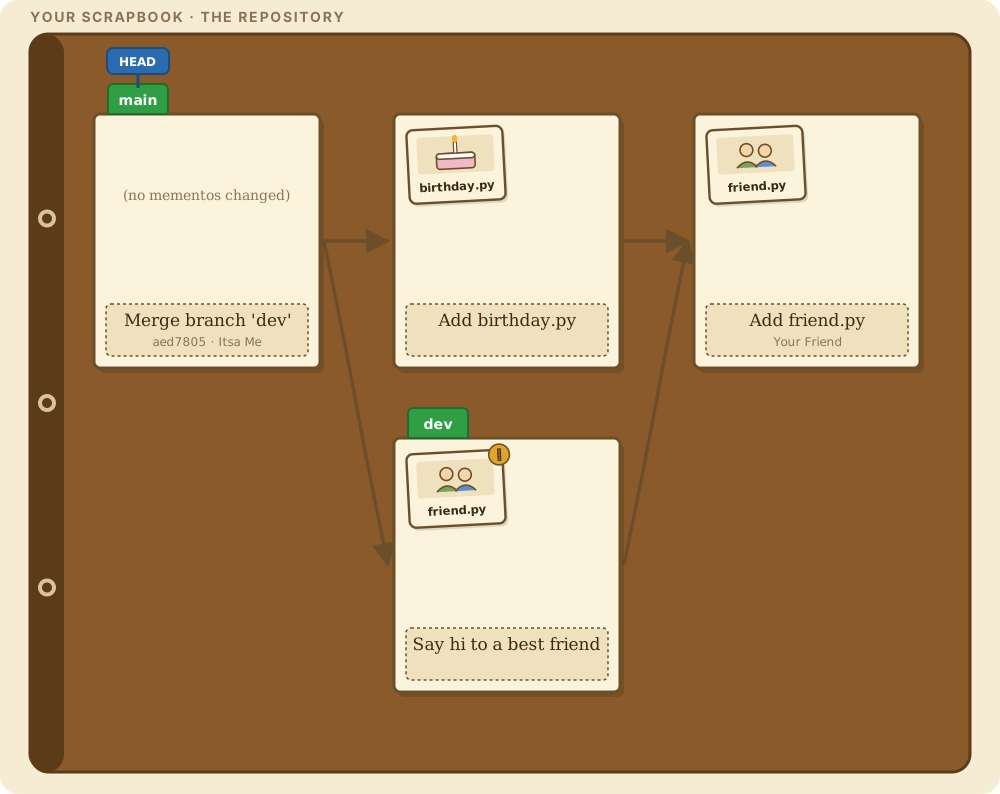
Look at the front of main: a brand new page. Strange, though. You did not add any mementos or run git commit. That is because Git made a special kind of page for you: a merge commit.

A merge commit is Git's way of rejoining two diverging sections as one shared page. Unlike a normal page, it has TWO parents, one from each storyline it connects. On the graph, two arrows lead backward from it instead of one. Hover it to see both.

Why dev stayed behind

Notice something else: the dev marker did not move. When you merged, main was the active branch, so Git brought the extra dev page onto the main storyline. The dev section itself was not changed at all, so its marker stayed put.

Since dev looks kind of sad back there, let's bring it up to date with main. How? Oddly enough, with git merge again. It will make more sense to see it. First, make dev the active branch.

Over to dev

Make dev the active branch:

Type this into the terminal below
git switch dev

HEAD zipped over and landed on the dev marker, so dev is now the active branch. Your table shows dev's files: no birthday.py here yet.

safe Switches to 'dev'.

Fast-forward

With dev checked out, grab the fresh merge commit from main:

Type this into the terminal below
git merge main

And... whoosh. But wait. No new merge commit this time. In fact, no new commit at all.

Instead, Git scooted the dev marker forward to sit on the same page as main. That is a fast-forward merge. Since main already had everything dev had, plus more, Git did not need to mess around with any pages. It just advanced the marker. Think of it as skipping ahead in the scrapbook to catch up with the section that already has more pages.

safe Brings in 2 commit(s) from main (fast-forward).

Together again

Both markers on one page, and HEAD on dev. The two storylines are one story again.

So here is the summary. If branches have diverged, Git rejoins them with a merge commit, a page with two parents. If the active branch is simply further back in the same storyline, Git fast-forwards its marker to the newer page and no merge commit is needed. Merging is how sections eventually come together to tell one unified story.

git-sim
Initial CommitDevlands

The graph appears here when the first command runs. The simulations are drawn by git-sim from a real repository.

The scrapbook · one picture for every Git idea

The scrapbook picture appears as the story is told.