Tools
git-dummy
Repositories on demand: generate the Git history, remote and working-tree state you ask for, from a one-liner, a Python call or a recipe file.
- Build any repository shape in one command: merges, tags, a stopped conflict, a diverged remote, a detached HEAD.17 named scenariosRealistic files & messages--seed for the same repo every timefast-import for thousands of commits
- Drive it from tests and tutorials: the Python API returns every path, id and state it made.Python API--jsonRecipe files--print-script--clean
- Practice on it with git-sim: a safe repository to try any command in and watch what happens.git-simThe lessons on this siteEvery demo graph here
$ git-dummy --scenario diverged-remote
What git-dummy makes
A real Git repository, built by your own git, in the shape you describe.
Commits, branches, merges and tags; a remote beside the repo that is ahead, behind or diverged; staged, modified and untracked files; a stash; a merge stopped on a conflict; a detached HEAD; a worktree; a submodule. Plain main.1 files and "Dummy commit #1" messages by default, or --style realistic for a small web service with a README, source and tests, commit messages that read like a real log, and a few authors.
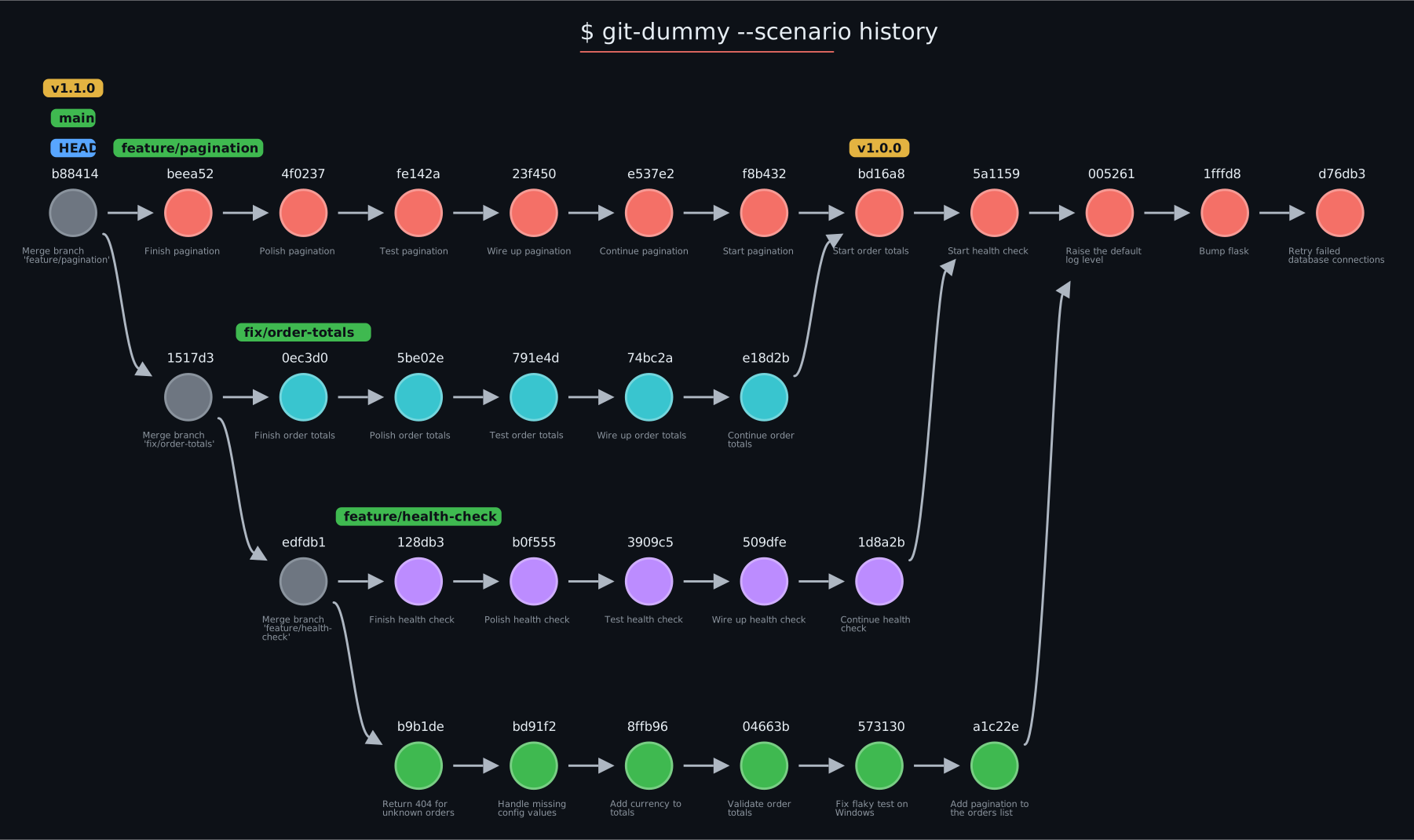
The history scenario, drawn by git-sim. The sample repositories behind every graph on this site are built with git-dummy.
$ git-dummy --commits=10 --branches=4 --merge=1     # 4 branches of 10 commits, 1 merged into main
$ git-dummy --scenario merge-conflict              # a merge stopped on a conflict
$ git-dummy --style realistic --commits 8 --branches 3 --remote --behind 2 --staged 1 --untracked 1
Every repo has a main. Other branches are branch1 ... branchN, or the names you give with --branch-names, or realistic ones with --style realistic. Each diverges from main at --diverge-at, or at a random commit; --merge=1,3 merges the ones you pick back in.
What it is for
The situations tools, tests and tutorials keep needing, without hand-building them.
git_dummy.build(...) gives a test the exact shape it needs and returns the paths, ids and states it made. git-sim's own validation suite runs on it.
A conflicted merge, a diverged remote, a detached HEAD, a dirty working tree: one --scenario each, ready to poke at.
Repositories with real-looking files, messages and authors, the same every time with --seed, for lessons, talks and screenshots.
Try a rebase, a reset or a force-push on a repo that does not matter, and watch it in git-sim first.
Thousands of commits in seconds through git fast-import, to see how a tool copes with a large history.
--print-script writes the equivalent plain git commands as a shell script, for a CI job or a tutorial's appendix.
Scenarios
git-dummy --scenario <name> starts from one of these; any other option overrides the scenario's choice.
| Scenario | What you get |
|---|---|
clean | A tidy linear history on main. |
history | Twelve commits, three merged topic branches, two tags: for log and graph demos. |
rebase-ready | A feature branch diverged from main with commits on both, checked out on the feature. |
merge-conflict | A merge stopped on a conflict, markers in the file. |
messy-worktree | Staged, modified and untracked files plus a stash. |
ahead-of-remote | Two local commits not pushed yet. |
behind-remote | Two commits on the remote not fetched yet. |
diverged-remote | Both sides moved on: push rejected, pull merges, force-push overwrites. |
detached-head | HEAD detached at an older commit. |
release | Tagged releases on main and a hotfix branch off the last one. |
orphan | A gh-pages branch with its own root. |
criss-cross | Two branches that each merged the other. |
octopus | Three topic branches merged into main in one commit. |
submodule | A submodule pinned to a small library repo built beside the repo. |
worktree | A linked worktree beside the repo, checked out on a branch. |
reflog | A few HEAD moves so the reflog has entries. |
large | Two thousand commits on five branches, through fast-import. |
git-dummy --list-scenarios prints the list.
Install and run
Python 3.8 or newer and Git 2.28 or newer on PATH. git-dummy runs your own git; nothing else is needed.
pip install git-dummyor pipx install git-dummy, or uv tool install git-dummy
cd path/to/dummy/parent
git-dummy
A repo called dummy appears in a subdirectory; --name renames it, --git-dir puts it elsewhere, --no-subdir uses the current directory.
git-dummy --scenario rebase-ready --name practice
git-dummy --style realistic --seed 7 --remote --behind 2 --json
git-dummy --commits 3000 --branches 5 --fast
git-dummy --clean dummy
a scenario, a reproducible realistic repo described as JSON, a large history through fast-import, and a clean-up that removes only what git-dummy made. git-dummy -h lists every option.
From Python
The same options as keyword arguments, and a description of what was built.
from git_dummy import build, Spec

r = build(commits=6, branches=2, style="realistic", seed=7, remote=True, behind=2, git_dir="/tmp")
r["path"]                  # where it is
r["branches"]["main"]      # tip ids
r["remote"]["path"]        # the bare remote beside it
r["worktree"]["staged"]    # what is staged, modified, untracked, in conflict
r["commits"]               # every commit: sha, parents, author, message

build(scenario="merge-conflict", git_dir="/tmp", name="cx")
build(Spec.from_recipe("repo.yaml"))
git_dummy.script(spec) returns the shell script; git_dummy.clean(path) removes a repo git-dummy made. A recipe file (--from repo.json or .yaml) holds the same options for reuse.
Options
The ones you will reach for; the README lists them all.
| Area | Options |
|---|---|
| Shape | --commits, --branches, --diverge-at, --merge, --branch-names, --tags, --files |
| Structure | --octopus, --criss-cross, --orphan-branch, --worktree, --submodule |
| Remote | --remote, --ahead, --behind |
| Working tree | --modified, --staged, --untracked, --stashes, --conflict, --detached, --checkout, --reflog |
| Content | --style plain|realistic, --seed, --constant-sha |
| Where and how | --name, --git-dir, --no-subdir, --allow-nested, --fast, --from, --json, --print-script, --clean |
Questions
Can git-dummy touch an existing repository?
No. It refuses to build inside an existing Git repository unless you pass --allow-nested, and even then never at the level of an existing .git folder. --clean removes only a repository git-dummy itself made.
Will I get the same repository twice?
Yes, with --seed: every random choice and every commit date is fixed, so the same seed gives the same files, messages and ids. --constant-sha does the same for the classic plain style, and is what git-sim's test fixtures use.
Does it need GitPython or any other library?
No. git-dummy 0.2 runs your installed git and nothing else. Large histories go through git fast-import.
How do I use it with git-sim?
Build a repository, step into it, and run any git-sim command: git-dummy --scenario rebase-ready --name practice && cd practice && git-sim rebase main. The graph shows what the command would do; the repository is yours to break.
git-dummy is free and open source, made by Jacob Stopak for Initial Commit.