Git commands
How to delete a remote branch in Git, and how to get it back
git push --delete: removing a branch from the remote
How to use this page
- slider / ▶Drag the slider, or press play, to watch the command happen. Before and After jump to either end.
- ← → · spaceStep through a multi-step command; space toggles Before / After.
- APlay or pause the loop (the page opens playing). Any manual input takes over.
- hoverA commit shows its message, author, date and parents, with its history highlighted.
- clickCopies the commit sha.
- ctrl + wheelZoom around the cursor (pinch on a trackpad). Double-click resets the view.
- EscStop playback, reset the view, close this menu.
- shareThe Share button copies a link to this graph, copies it as an image, downloads PNG/SVG/page, or posts it. #before, #after or #step=N in the link pins the state.
git-sim visually simulates any Git command in your own repos - from your terminal, IDE, or AI.
Table of Contents
- Introduction
- What is git push --delete?
- Watch it happen
- Before and after
- Is it safe?
- How to undo it
- Useful forms
- What your teammates see
- Try it on your repository
- Common questions
- Summary
- Next steps
- Related commands
Introduction
If you've ever finished a feature, merged it and deleted the branch on your machine, you've probably noticed the branch is still sitting on GitHub afterwards. Deleting a local branch never touches the remote. To remove the copy on origin you have to push the deletion, and that's what git push origin --delete does.
In this article, we'll:
- Watch
git push origin --delete featureremoveorigin/featureand leave three commits unreachable on origin - See why your local
featurebranch is kept - Cover the older colon syntax, what your teammates see, and how to put the branch back
What is git push --delete?
git push <remote> --delete <branch> asks the remote to delete one of its branches. When the remote agrees, Git also deletes your matching remote-tracking branch (origin/feature here), since there's no longer anything on origin for it to track. It's a regular git push, except that instead of sending commits and moving a branch forward, it removes the branch.
Nothing is deleted on your side except that label. Your local branch, your files and your commits all stay put.
Watch it happen
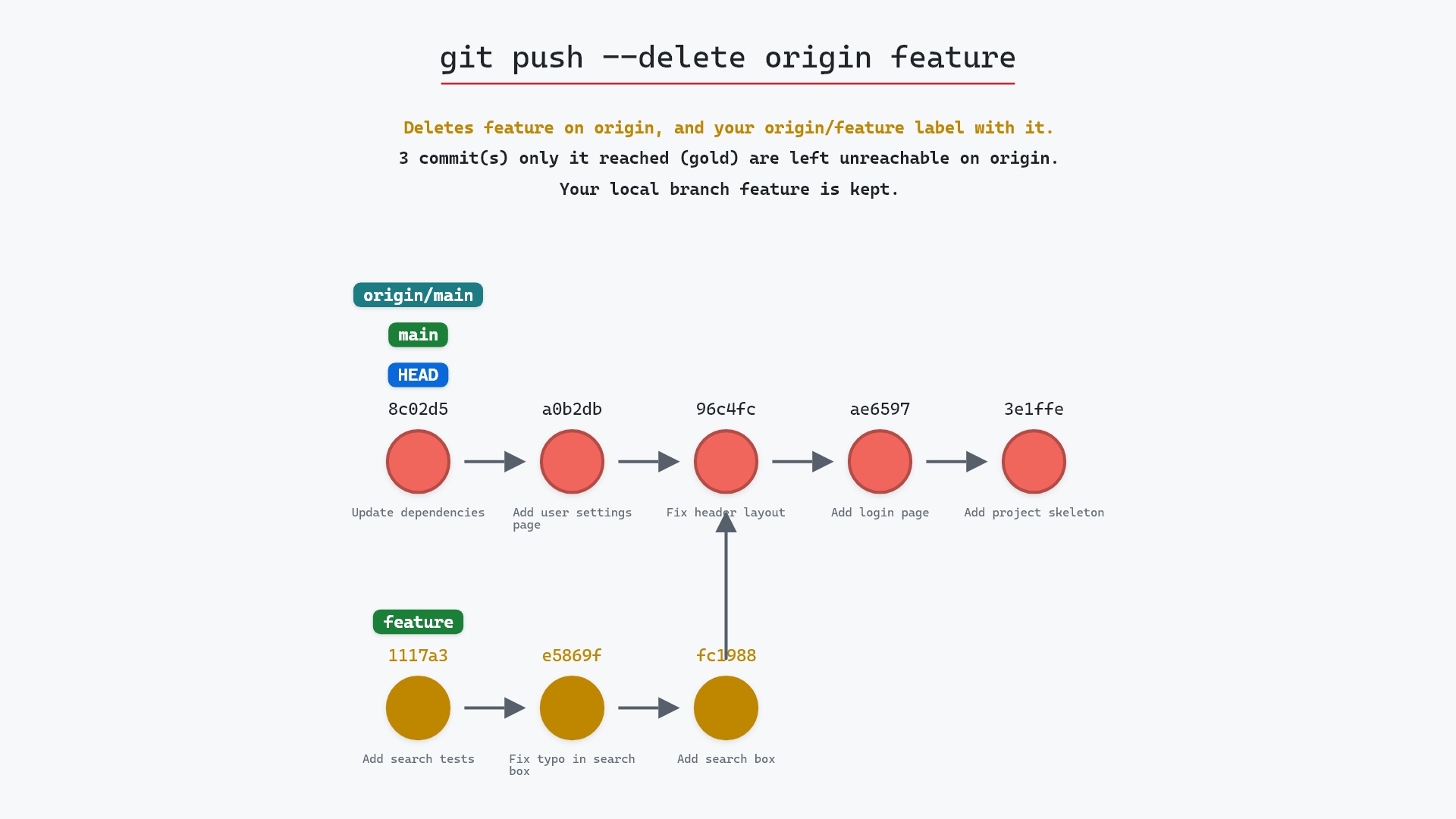
Our sample repo has a feature branch on origin that is no longer needed there. Both feature and origin/feature point at 1117a34 "Add search tests", and main is checked out. Here's git push origin --delete feature:
- Before:
main,HEADandorigin/mainpoint at8c02d5b"Update dependencies". The threefeaturecommits, "Add search box", "Fix typo in search box" and "Add search tests", branch off96c4fc2"Fix header layout", and bothfeatureandorigin/featurepoint at1117a34. - Git deletes
featureon origin, then your remote-tracking branchorigin/featurethat tracked it. - The three
featurecommits are no longer reachable from any branch on origin. Your localfeaturebranch stays on1117a34, because push doesn't touch it.
The gold describes origin's side of things. Those commits are perfectly safe in your repository, since feature still points at them.
Before and after
Git's whole report is two lines:
The raw git output, if you want to read along in text
git log --oneline --graph --all
before
* 1117a34 (origin/feature, feature) Add search tests
* e5869f0 Fix typo in search box
* fc19889 Add search box
| * 8c02d5b (HEAD -> main, origin/main, origin/HEAD) Update dependencies
| * a0b2db3 Add user settings page
|/
* 96c4fc2 Fix header layout
* ae65976 Add login page
* 3e1ffe4 Add project skeleton
* 4114b2c Initial commit
after
* 1117a34 (feature) Add search tests
* e5869f0 Fix typo in search box
* fc19889 Add search box
| * 8c02d5b (HEAD -> main, origin/main, origin/HEAD) Update dependencies
| * a0b2db3 Add user settings page
|/
* 96c4fc2 Fix header layout
* ae65976 Add login page
* 3e1ffe4 Add project skeleton
* 4114b2c Initial commit
what git printed
To ../your_project.git
 - [deleted]         feature
In the before log, 1117a34 is labeled (origin/feature, feature). In the after log it's just (feature). Everything else, including origin/main, is exactly the same.
Is it safe?
Destructive git-sim pre-flight
DELETES the branch feature on origin (for everyone who uses it).
What you would lose
- remote commit 1117a34 Add search tests
- remote commit e5869f0 Fix typo in search box
- remote commit fc19889 Add search box
The way back
Put it back with: git push origin 1117a34:refs/heads/feature
git-sim rates this destructive, and it's right to. Deleting a branch on the remote deletes it for everyone who uses that remote, and the three commits that only feature reached are left unreachable there. Hosting services usually don't delete unreachable commits right away, but you shouldn't count on them staying forever.
In this sample, nothing is really at risk, because you still have feature locally with all three commits. The danger is when the remote was the only place a branch existed, say a teammate pushed it and you never fetched it. Then you're deleting work nobody else has a copy of.
git push origin --delete when I clean up experiments I pushed from the command line and never opened a pull request for. I still run git branch -a first, to make sure the name I type is the one I mean.
How to undo it
Push the commit back under the same branch name. git-sim's pre-flight report gives the exact command:
git push origin 1117a34:refs/heads/feature
That creates feature on origin again at 1117a34, and your next fetch brings origin/feature back. Since you still have the local branch, git push -u origin feature works too, and it also sets the upstream again, the same way git push -u publishes any new branch.
If the branch was deleted through a pull request on GitHub, the pull request page has a Restore branch button. GitHub Docs covers it in Deleting and restoring branches in a pull request.
Useful forms
git push origin :featureis the older way to write the same thing. It reads as "push nothing tofeature", and Git 1.7.0 added--deleteas a friendlier spelling of it.git push -d origin featureis the short form of--delete.git push origin --delete feature hotfixdeletes several branches in one push.git branch -d featuredeletes your local branch too, once you're done with it. git branch -d checks that its commits are merged first, and-Dskips that check.
What your teammates see
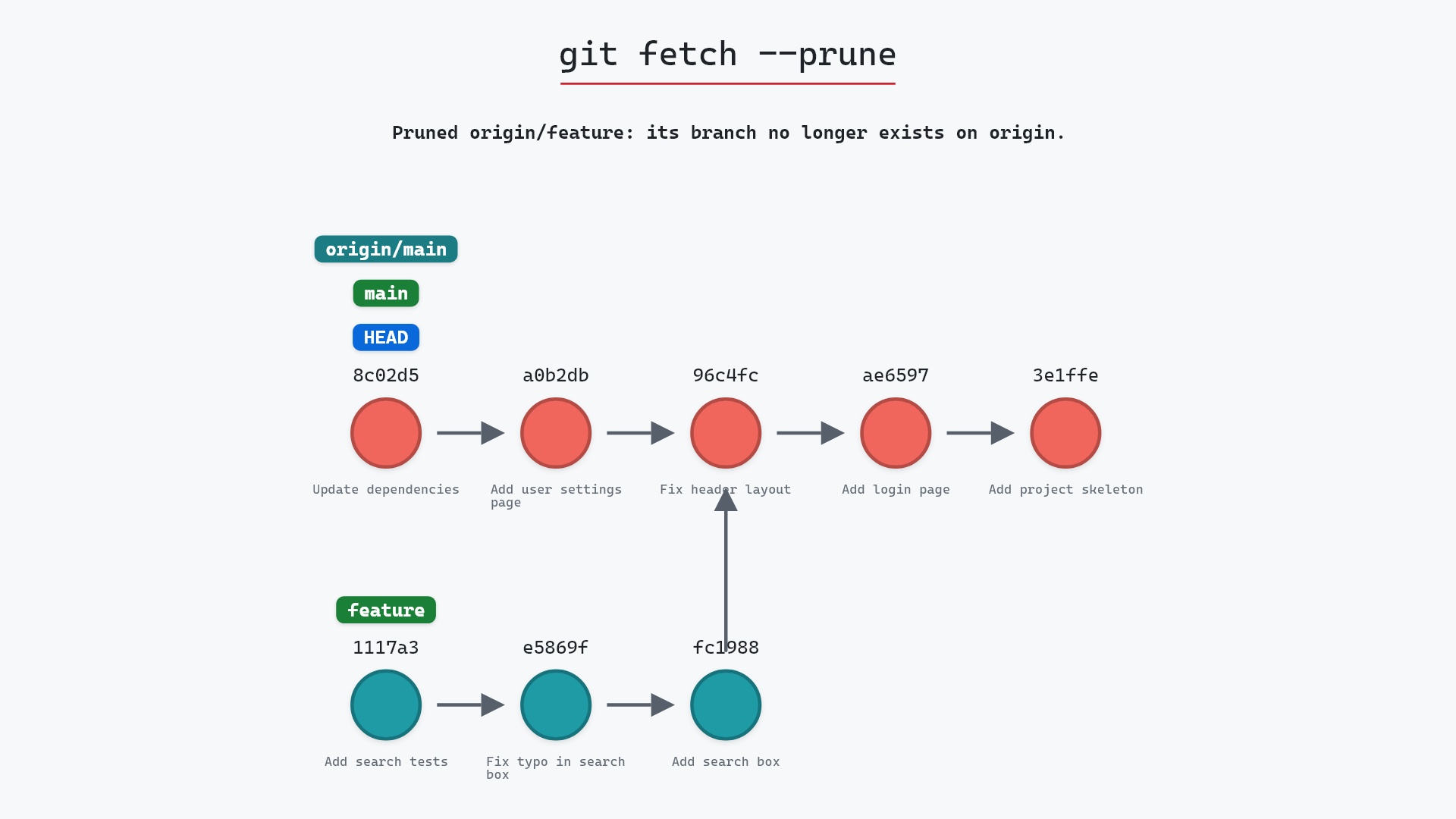
Nothing changes for them right away. Their origin/feature stays in their repository until they fetch with pruning turned on, which is what git fetch --prune is for. Keep in mind that if a teammate still has a local feature and pushes it, the branch comes right back on origin. So it's worth telling people when you delete a shared branch.
Try it on your repository
pip install git-sim
git-sim push origin --delete feature
git-sim shows which commits would be left unreachable on the remote before anything is deleted, and it doesn't push anything itself.
Common questions
How do I delete a remote branch in Git?
Run git push origin --delete <branch>. Git removes the branch on origin and your origin/<branch> label along with it.
Does git push --delete delete my local branch?
No. Your local branch is kept, commits and all. Delete it separately with git branch -d <branch>.
What is the difference between git push --delete and git push origin :branch?
Nothing. --delete was added as easier-to-read syntax for pushing an empty source to the branch. Both delete the branch on the remote. The --delete entry in the git push documentation says so directly.
Can I restore a deleted remote branch?
Yes, as long as someone still has the commit. Push it back with git push origin <sha>:refs/heads/<branch>, or with git push origin <branch> if your local branch still exists. On GitHub, a branch deleted from a pull request can be restored from that pull request's page.
Why do my teammates still see the deleted branch?
Their origin/<branch> label only goes away when they run git fetch --prune (or have fetch.prune turned on).
Summary
In this article, we watched git push origin --delete feature remove the branch on origin along with our origin/feature label, saw its three commits turn gold as they became unreachable on origin while our local feature kept them, and covered how to push the branch back.
Next steps
git fetch --prune is what everyone else runs to clear out the branch you just deleted. git branch -d takes care of your local copy.
Related commands
- git branch -d, to delete the local branch as well
- git fetch --prune, how teammates drop a deleted branch's label
- git push, the command
--deleteis an option of - git push -u, to publish a branch again
- git branch -D, deleting a local branch whose commits aren't merged
- git push --force, the other push that can drop commits from a remote