Git commands
What git rebase --skip does to the commit that conflicted
git rebase --skip: leaving the conflicting commit behind
How to use this page
- slider / ▶Drag the slider, or press play, to watch the command happen. Before and After jump to either end.
- ← → · spaceStep through a multi-step command; space toggles Before / After.
- APlay or pause the loop (the page opens playing). Any manual input takes over.
- hoverA commit shows its message, author, date and parents, with its history highlighted.
- clickCopies the commit sha.
- ctrl + wheelZoom around the cursor (pinch on a trackpad). Double-click resets the view.
- EscStop playback, reset the view, close this menu.
- shareThe Share button copies a link to this graph, copies it as an image, downloads PNG/SVG/page, or posts it. #before, #after or #step=N in the link pins the state.
git-sim visually simulates any Git command in your own repos - from your terminal, IDE, or AI.
Table of Contents
- Introduction
- What is git rebase --skip?
- Watch it happen
- Before and after
- Is it safe?
- When to skip
- How to undo it
- Useful forms
- Try it on your repository
- Common questions
- Summary
- Next steps
- Related commands
Introduction
When a rebase stops on a conflict, Git's hint offers three ways forward, and git rebase --skip is the one people reach for least often. It doesn't resolve anything. It leaves out the commit that conflicted, entirely, and carries on with the rest. That's the right move in a few situations and a mistake in others, so let's see exactly what disappears.
In this article, we'll:
- Watch
git rebase --skipdrop a conflicting commit and finish a rebase - See which change is no longer on the branch afterwards
- Cover when skipping is the right call, how it compares with
--continue, and how to get the dropped commit back
What is git rebase --skip?
git rebase --skip abandons the commit the rebase is currently stuck on and moves on to the next one in the to-do list. The git rebase documentation calls it "Restart the rebasing process by skipping the current patch." Any conflict markers and half-resolved edits for that commit are thrown out, and no new commit is made for it on the new base. When the list runs out, your branch moves to the last commit the rebase did make.
Watch it happen
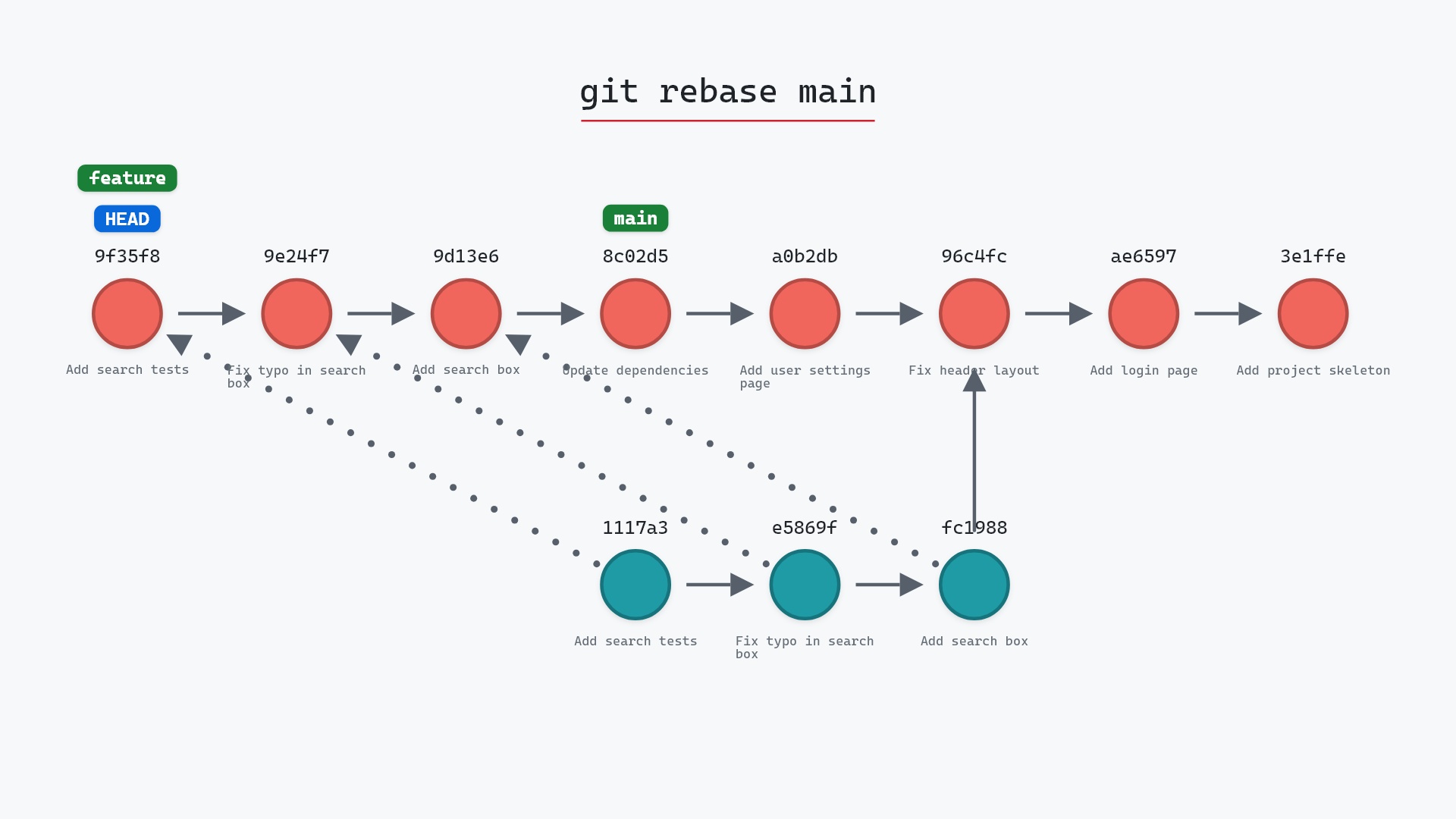
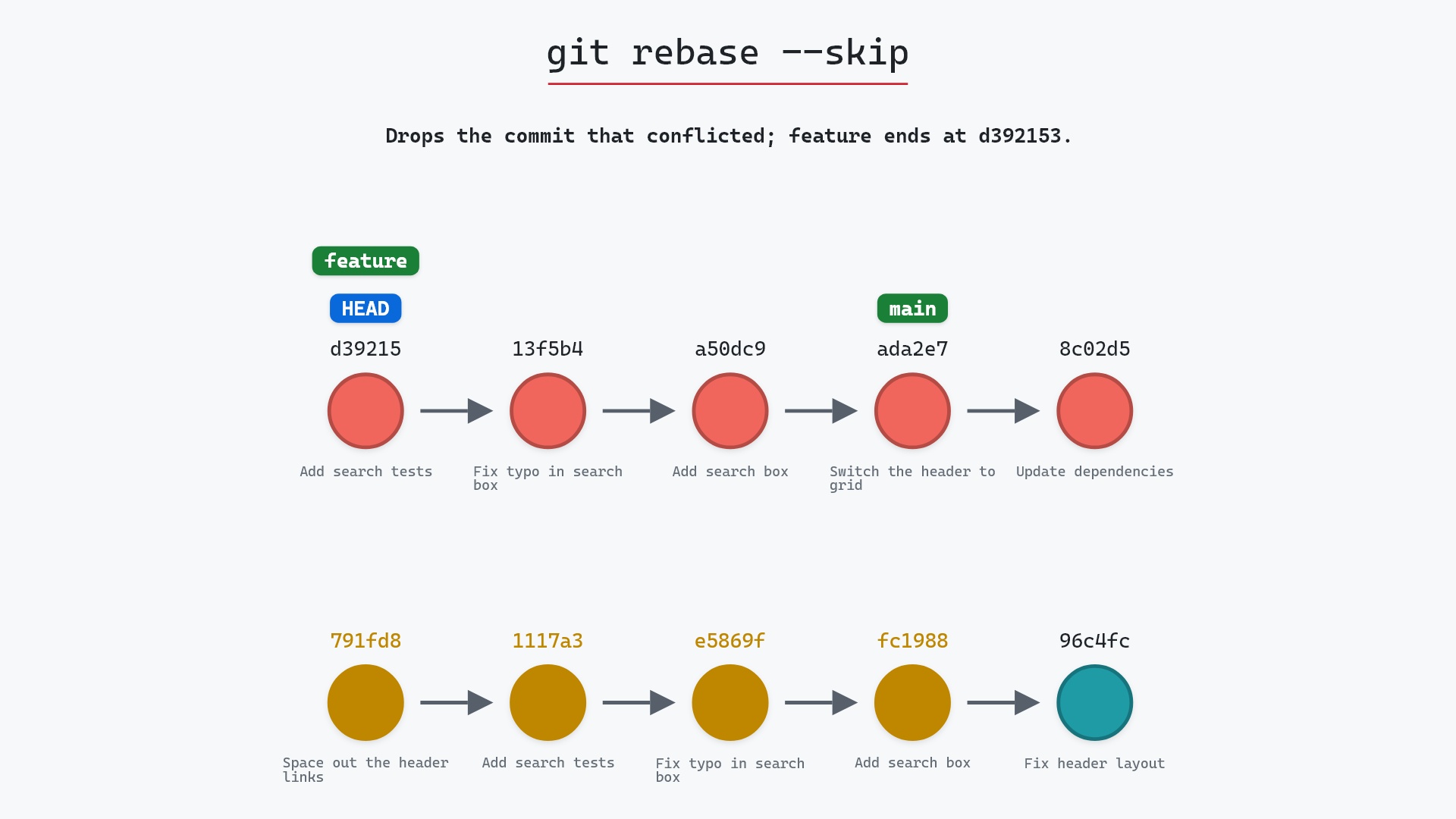
Our sample repo has a rebase of feature onto main stopped on a conflict in styles.css. Here is how it got there: we ran git rebase main on feature. Git reapplied "Add search box", "Fix typo in search box" and "Add search tests" onto main's "Switch the header to grid" (ada2e79), then stopped on the fourth commit, "Space out the header links" (791fd8e), because it changes the same line of styles.css as main did. We haven't resolved anything. Here's git rebase --skip:
- Before:
HEADis detached ond392153, the rebase's new "Add search tests" commit, on top of the other two new commits andmain.featurestill points at791fd8e, the original "Space out the header links", with the three other original commits behind it. - Git drops "Space out the header links" without creating a new commit for it.
featuremoves tod392153, whereHEADalready is, andHEADis attached to it again. The four originals,fc19889through791fd8e, are no longer reachable from a branch. mainstays onada2e79, andHEADitself never moves. The skip only decides wherefeatureends.
Before and after
Before, there are two lines: the new commits on main with HEAD on top, and the original feature below. After, feature is a straight line ending at d392153 "Add search tests", and the log has no "Space out the header links" anywhere. Git reports the finish in one line:
The raw git output, if you want to read along in text
git log --oneline --graph --all
before
* d392153 (HEAD) Add search tests
* 13f5b4f Fix typo in search box
* a50dc9c Add search box
* ada2e79 (main) Switch the header to grid
* 8c02d5b Update dependencies
* a0b2db3 Add user settings page
| * 791fd8e (feature) Space out the header links
| * 1117a34 Add search tests
| * e5869f0 Fix typo in search box
| * fc19889 Add search box
|/
* 96c4fc2 Fix header layout
* ae65976 Add login page
* 3e1ffe4 Add project skeleton
* 4114b2c Initial commit
after
* d392153 (HEAD -> feature) Add search tests
* 13f5b4f Fix typo in search box
* a50dc9c Add search box
* ada2e79 (main) Switch the header to grid
* 8c02d5b Update dependencies
* a0b2db3 Add user settings page
* 96c4fc2 Fix header layout
* ae65976 Add login page
* 3e1ffe4 Add project skeleton
* 4114b2c Initial commit
what git printed
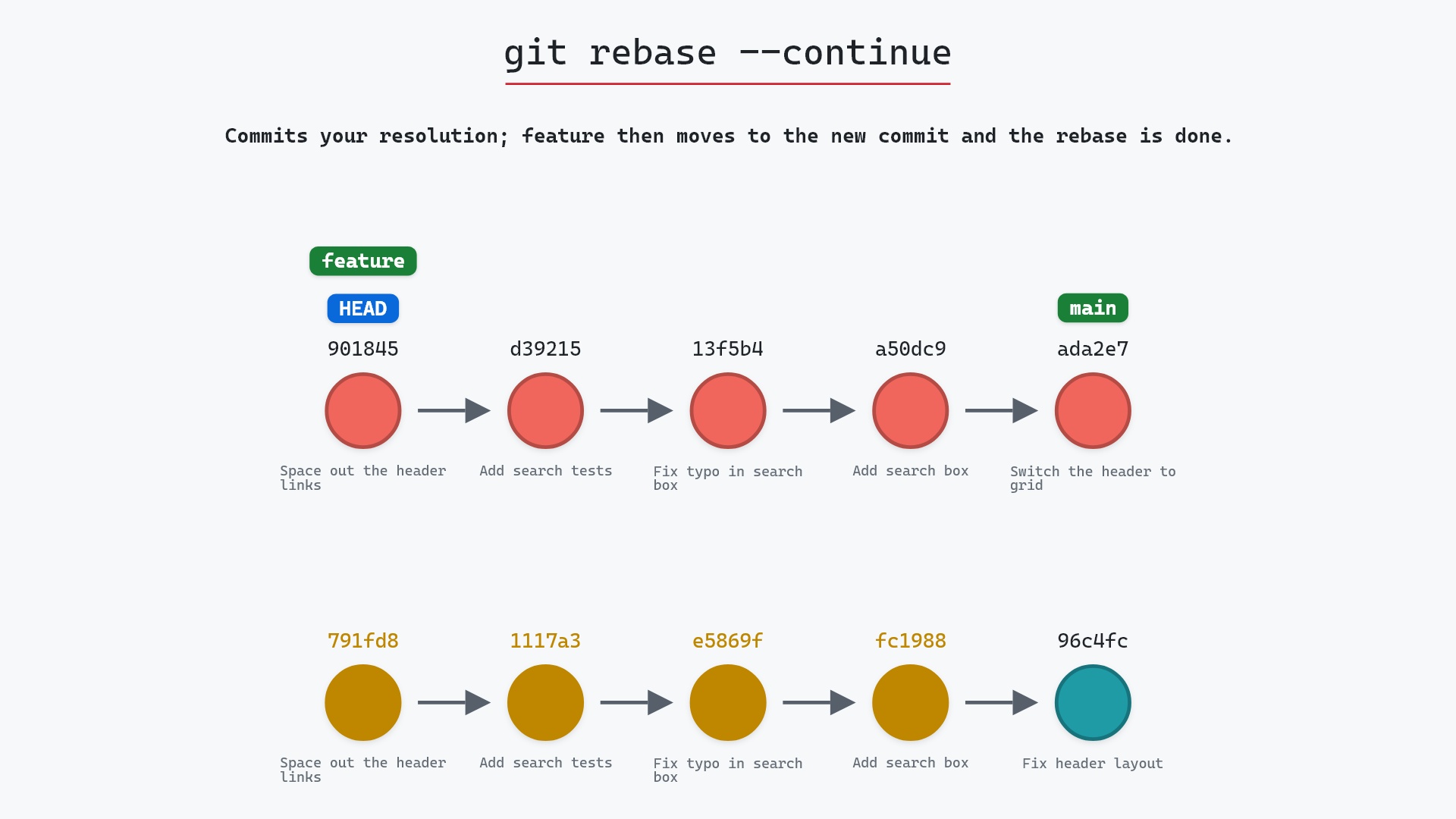
Successfully rebased and updated refs/heads/feature.Compare that with git rebase --continue on the same stopped rebase. There, the resolution becomes a fourth new commit (c92d520 in our sample) and feature ends on it. With --skip, feature ends one commit earlier, and styles.css holds main's header { display: grid; } without the gap: 12px the branch had added.
Is it safe?
Caution git-sim pre-flight
Drops 791fd8e Space out the header links from the rebase and carries on with the rest; any resolution work on it is discarded.
What you would lose
- your edits to styles.css for the skipped commit (not recoverable)
Be clear about what you're giving up. The skipped commit's change is no longer on the branch. In our sample, the spacing between the header links is simply gone from feature. Git doesn't warn you or keep the change on the branch, and if you had started editing styles.css to resolve the conflict, those edits go too. If rerere was turned on, the skip also clears whatever it had recorded for that conflict.
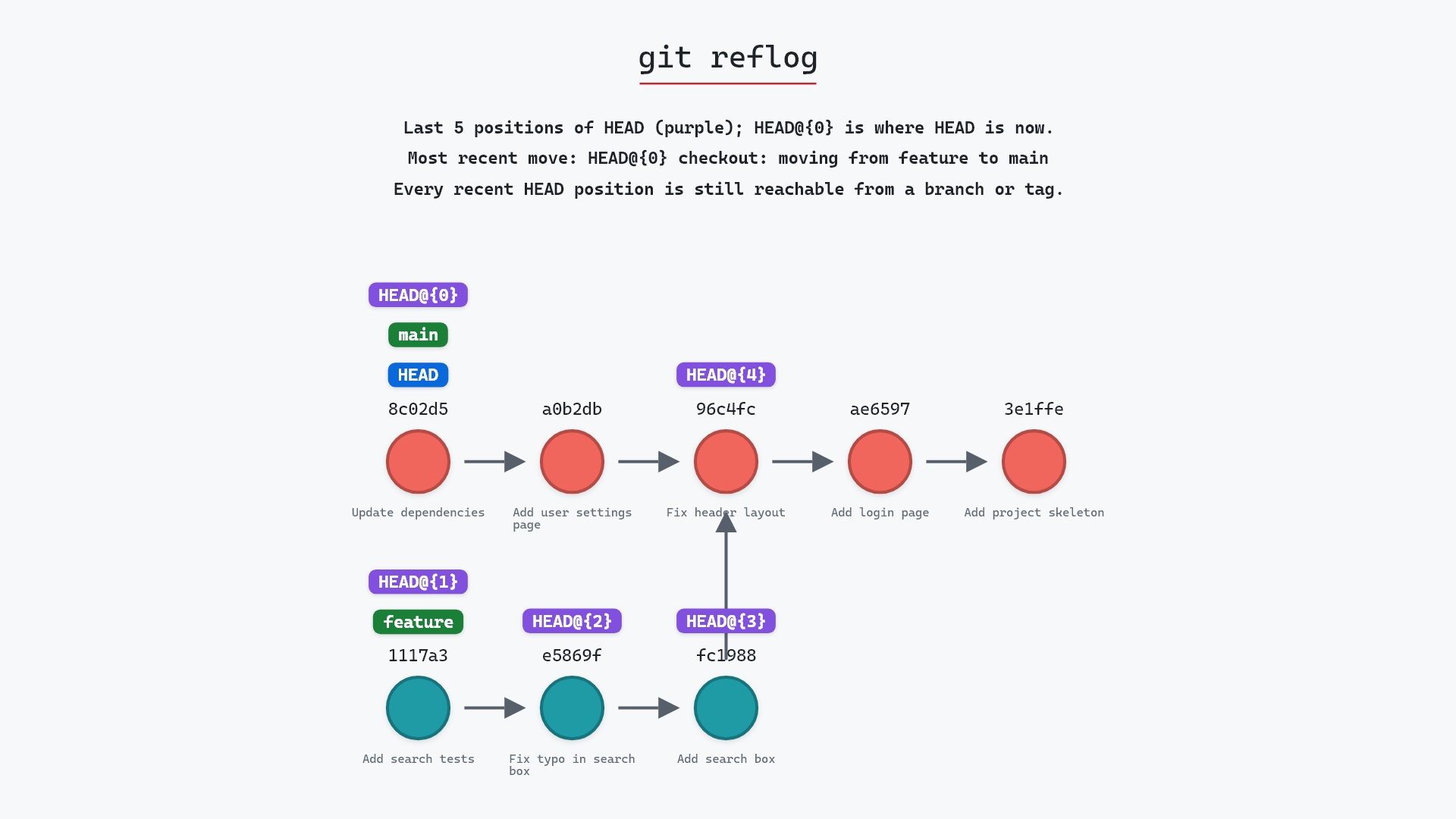
The commit itself still exists. 791fd8e is unreachable from any branch now, but the reflog knows it, since it was feature's tip before the rebase. It stays recoverable until the reflog entry expires and garbage collection prunes it, which by default takes weeks.
When to skip
Skipping is the right answer when the conflicting commit shouldn't be on the new base at all:
- The change is already upstream. Say you fixed a bug on your branch and the same fix landed on
mainin a slightly different form. Rebase already leaves out commits whose change is identical to one upstream, but if the two versions differ even a little, it stops on a conflict instead. Skipping drops your redundant commit. - You no longer want the change. Perhaps
main's "Switch the header to grid" replaced the layout that "Space out the header links" was tweaking, and the gap no longer matters.
If you want any part of the commit's change, skip is the wrong tool. Resolve the conflict and run --continue instead, even if the resolution keeps only one line. And if you knew before starting that a commit should go, git rebase -i lets you drop it from the to-do list up front.
--skip on purpose were after a small fix of mine had been merged upstream through someone else's pull request, reworded just enough that the rebase couldn't tell it was the same change. Every other time the conflict meant my commit still had something to say, and I resolved it.
How to undo it
If you skipped something you needed, the quickest fix is to apply the commit's change back onto the branch with git cherry-pick, using its original hash:
git cherry-pick 791fd8e
It will conflict on styles.css for the same reason the rebase did, so this time resolve it, git add styles.css, and run git cherry-pick --continue. If you don't have the hash, git reflog feature shows the branch's tip before the rebase.
To throw away the whole rebase instead and put feature back on its four original commits:
git reset --hard feature@{1}
Useful forms
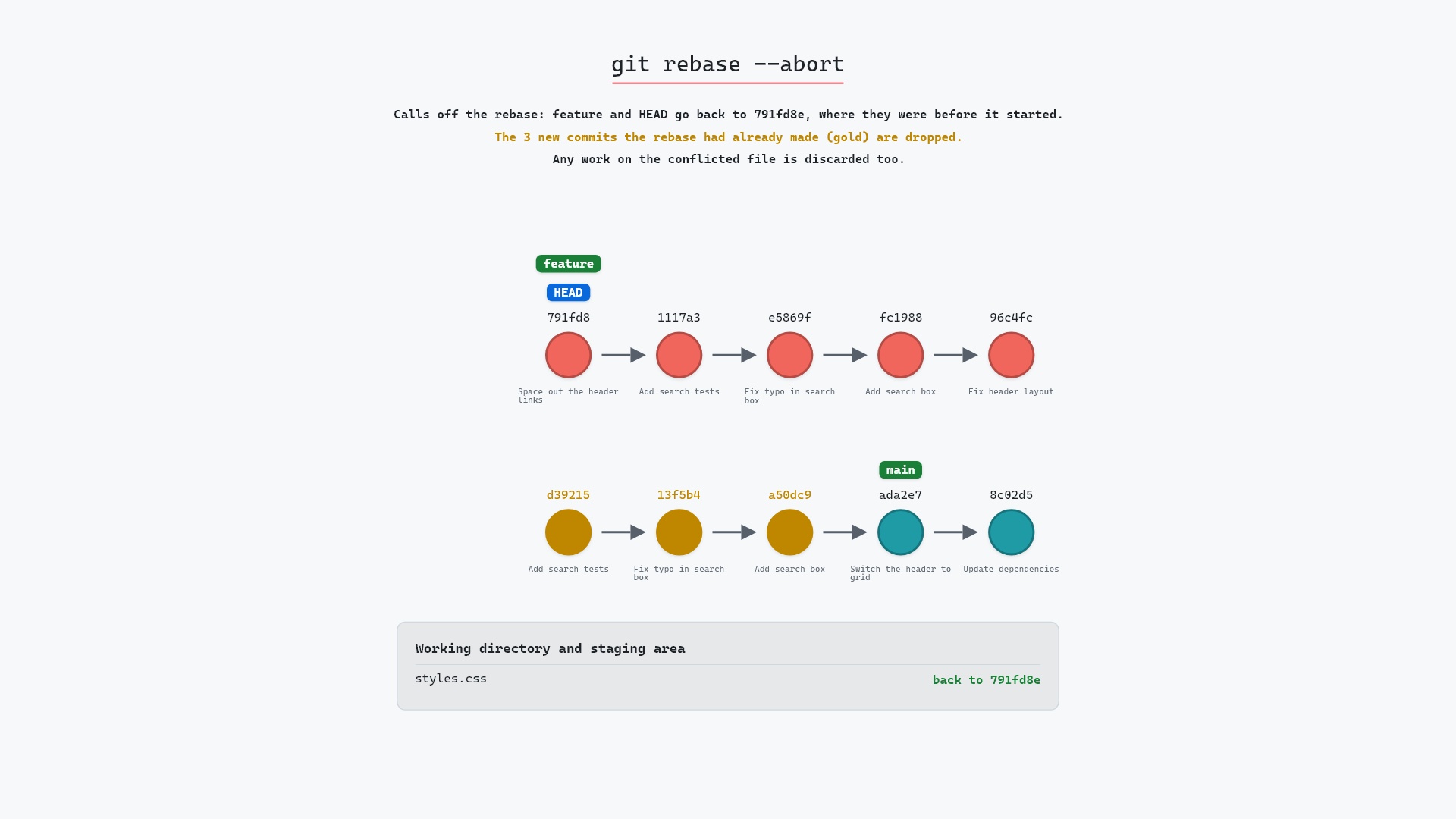
git rebase --skipdrops the current commit and continues with the next one.git rebase --continuecommits your resolution of the current commit instead.git rebase --abortcancels the whole rebase and puts the branch back where it started.git statusduring the rebase shows which commit you're stopped on, so you know what you'd be skipping.
Try it on your repository
pip install git-sim
git-sim rebase --skip
git-sim runs the skip in a copy of your repository, so yours isn't touched, and shows where your branch would end and which commits would be left behind.
Common questions
What does git rebase --skip do?
It drops the commit the rebase stopped on, without reapplying it on the new base, and continues with the remaining commits. Your branch ends up without that commit's change.
Is the skipped commit deleted?
It's gone from the branch but still in the repository for a while. Find it with git reflog and bring it back with git cherry-pick.
What is the difference between git rebase --skip and --continue?
--continue commits your conflict resolution as the new version of the commit. --skip leaves the commit out, so its change never reaches the rebased branch.
When should I use git rebase --skip?
When the conflicting commit's change is already on the branch you're rebasing onto, or when you've decided you don't want that change anymore.
Summary
In this article, we watched git rebase --skip drop "Space out the header links", leaving feature on d392153 with the four originals gold, and covered when skipping is right, how it differs from --continue, and how to get a skipped commit back.
Next steps
git rebase --continue keeps the commit by committing your resolution. git rebase --abort backs out of the rebase entirely.
Related commands
- git rebase, the rebase that stopped on the conflict
- git rebase --continue, to keep the commit instead of skipping it
- git rebase --abort, to call off the whole rebase
- git reflog, to find a commit you skipped
- git cherry-pick, to reapply a skipped commit on the branch
- git rebase -i, to drop a commit on purpose before replaying