Git commands
What git branch -m renames, and what it leaves behind on the remote
git branch -m: a new name, the same commits
How to use this page
- slider / ▶Drag the slider, or press play, to watch the command happen. Before and After jump to either end.
- ← → · spaceStep through a multi-step command; space toggles Before / After.
- APlay or pause the loop (the page opens playing). Any manual input takes over.
- hoverA commit shows its message, author, date and parents, with its history highlighted.
- clickCopies the commit sha.
- ctrl + wheelZoom around the cursor (pinch on a trackpad). Double-click resets the view.
- EscStop playback, reset the view, close this menu.
- shareThe Share button copies a link to this graph, copies it as an image, downloads PNG/SVG/page, or posts it. #before, #after or #step=N in the link pins the state.
git-sim visually simulates any Git command in your own repos - from your terminal, IDE, or AI.
Table of Contents
- Introduction
- What is git branch -m?
- Watch it happen
- Before and after
- Renaming the remote branch too
- Is it safe?
- Useful forms
- How to undo it
- Try it on your repository
- Common questions
- Summary
- Next steps
- Related commands
Introduction
If you've ever named a branch fix, test2 or feature and then had to explain it to a teammate a week later, you know the feeling. Luckily a branch name is just a label, and git branch -m swaps it for a better one without touching a single commit.
In this article, we'll:
- Watch
git branch -mrenamefeaturetosearchon a small repository - See what Git moves along with the name, and what it doesn't
- Cover the remote side: pushing the new name, deleting the old one, and fixing the upstream
What is git branch -m?
git branch -m <old> <new> renames a local branch. ("m" for "move", like mv.) Under the hood Git moves the ref file .git/refs/heads/<old> to .git/refs/heads/<new>, keeping the commit hash it holds. It also carries the branch's reflog and its config section (branch.<old>.remote, branch.<old>.merge and friends) over to the new name.
If you're renaming the branch you're on, you can leave out the old name: git branch -m <new>.
The one thing that makes -m refuse is a name that's taken. If a branch called <new> already exists, Git stops with "a branch named '-M is the forced version, which renames anyway and overwrites the existing branch. Only reach for it when you're sure the other branch can go.
Watch it happen
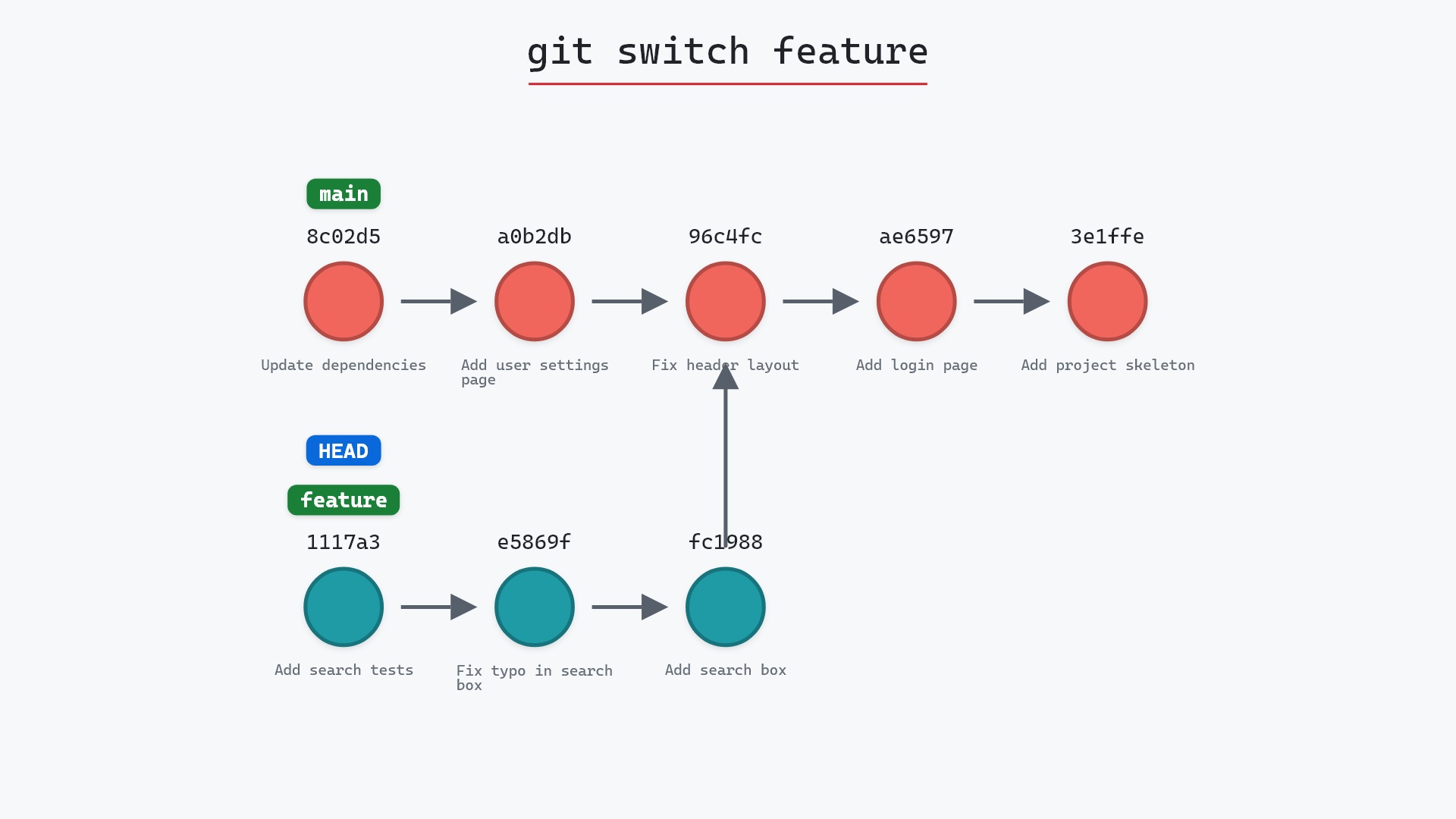
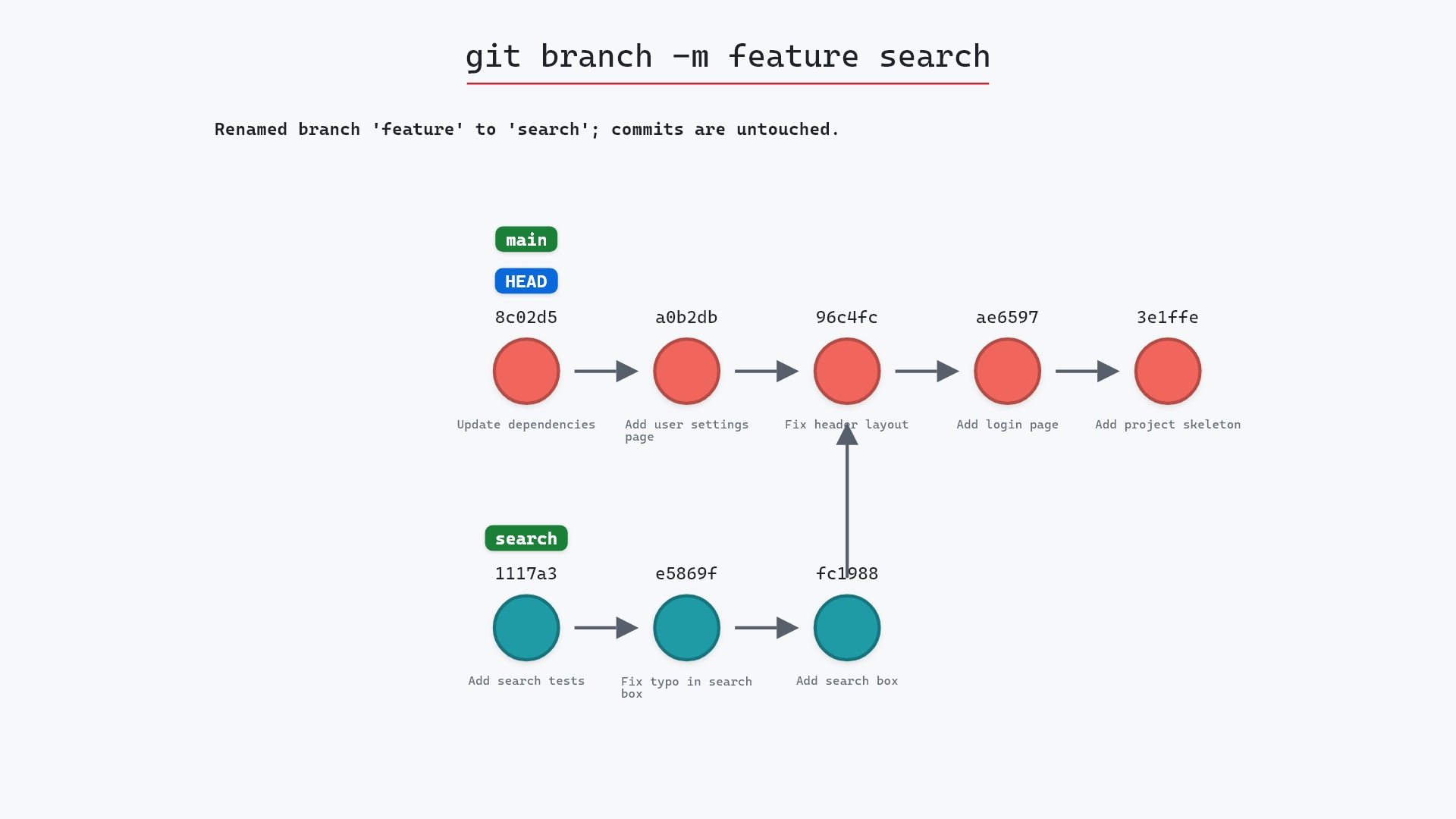
Our sample repo has a feature branch that deserves a better name: feature points at 1117a34, "Add search tests", three commits off 96c4fc2, "Fix header layout". HEAD is on main. Here's git branch -m feature search:
- Before:
featurepoints at1117a34, andHEADis attached tomainat8c02d5b, "Update dependencies". - Git creates the
searchref pointing at1117a34, the same commit asfeature. - Git deletes the
featureref. The commits are untouched:1117a34,e5869f0andfc19889are now onsearch.
Notice that we renamed a branch we weren't on. -m doesn't care whether the branch is checked out.
Before and after
The two graphs have the same commits with the same hashes. The only difference is the label on 1117a34. Git prints nothing at all when a rename succeeds, so the log is the only place to see it:
The raw git output, if you want to read along in text
git log --oneline --graph --all
before
* 1117a34 (feature) Add search tests
* e5869f0 Fix typo in search box
* fc19889 Add search box
| * 8c02d5b (HEAD -> main) Update dependencies
| * a0b2db3 Add user settings page
|/
* 96c4fc2 Fix header layout
* ae65976 Add login page
* 3e1ffe4 Add project skeleton
* 4114b2c Initial commit
after
* 1117a34 (search) Add search tests
* e5869f0 Fix typo in search box
* fc19889 Add search box
| * 8c02d5b (HEAD -> main) Update dependencies
| * a0b2db3 Add user settings page
|/
* 96c4fc2 Fix header layout
* ae65976 Add login page
* 3e1ffe4 Add project skeleton
* 4114b2c Initial commit
Renaming the remote branch too
Here's the catch. git branch -m is purely local. If feature had already been pushed, origin/feature is still sitting on the remote under the old name, and your new search branch still has feature recorded as its upstream (the config section moved, but it still says merge = refs/heads/feature).
There's no single "rename on the remote" command, so it takes two pushes (the Pro Git book walks through the same steps in Branch Management):
git push -u origin search
git push origin --delete feature
The first creates search on the remote and, with -u, resets the upstream so git pull and git status compare against origin/search. The second deletes the old name. Anyone else who had feature checked out will need to fetch and rename their own copy (git branch -m feature search, then git branch -u origin/search).
master to main in 2020, I renamed the default branch on a handful of my older repositories with git branch -m master main. The local rename took a second. Pushing main, switching the default branch in GitHub's settings, and deleting master on the remote was the part that needed a checklist.
Is it safe?
Safe git-sim pre-flight
Lists or creates branches; nothing at risk.
A rename creates and destroys no commits. Even -M, which can replace an existing branch, only removes that branch's name. Its commits stay in the object database until garbage collection, and in HEAD's reflog if you ever had them checked out.
Useful forms
git branch -m <new>renames the branch you're on.git branch -m <old> <new>renames any local branch.git branch -M <old> <new>renames even if<new>already exists, replacing it.git branch -c <old> <new>copies instead, leaving both names in place. The git branch documentation has the full list of flags.git config --global init.defaultBranch mainsets the namegit initgives the first branch, so you don't need to rename it later.
How to undo it
Rename it back:
git branch -m search feature
Since the commits never moved, that restores the repository exactly.
Try it on your repository
pip install git-sim
git-sim branch -m feature search
git-sim is read-only, so it draws the new label on your own graph without renaming anything.
Common questions
How do I rename the branch I'm currently on?
git branch -m <new-name>. With only one name given, Git renames the current branch.
What is the difference between git branch -m and -M?
-m refuses if a branch with the new name already exists. -M renames anyway and overwrites that branch. If -m claims the name already exists when you're only changing its case, such as Feature to feature, that's the case-insensitive file system (the Windows and macOS default) talking, and -M gets you through.
How do I rename a branch on GitHub or another remote?
Push the new name and delete the old one: git push -u origin <new> then git push origin --delete <old>. GitHub also has a rename button in its branch list, which updates open pull requests, but your local clone still needs git branch -m and a new upstream.
Does renaming a branch change its commits?
No. The branch ref keeps the same hash, so every commit, and every other branch that shares them, stays exactly as it was.
Summary
In this article, we watched git branch -m move the feature label on 1117a34 to a new name, search, with every commit left in place, and covered the two pushes it takes to carry a rename over to the remote.
Next steps
git branch covers what the label is in the first place, and git branch -d is how you tidy up a name once you're done with it.
Related commands
- git branch, what a branch name points at
- git branch -d, deleting a branch instead of renaming it
- git push, to publish the new name
- git switch, to move onto the renamed branch
- git checkout -b, to pick a better name up front
- git log, to see the new label in the decorations