Git commands
What git revert -m 1 undoes, and the catch when you merge again
git revert -m 1: undoing a whole merge
How to use this page
- slider / ▶Drag the slider, or press play, to watch the command happen. Before and After jump to either end.
- ← → · spaceStep through a multi-step command; space toggles Before / After.
- APlay or pause the loop (the page opens playing). Any manual input takes over.
- hoverA commit shows its message, author, date and parents, with its history highlighted.
- clickCopies the commit sha.
- ctrl + wheelZoom around the cursor (pinch on a trackpad). Double-click resets the view.
- EscStop playback, reset the view, close this menu.
- shareThe Share button copies a link to this graph, copies it as an image, downloads PNG/SVG/page, or posts it. #before, #after or #step=N in the link pins the state.
git-sim visually simulates any Git command in your own repos - from your terminal, IDE, or AI.
Table of Contents
- Introduction
- What is git revert -m 1?
- Watch it happen
- Before and after
- What -m 2 would do
- The catch: merging the branch again
- Is it safe?
- How to undo it
- Try it on your repository
- Common questions
- Summary
- Next steps
- Related commands
Introduction
If you have merged a feature branch and then realized it broke something, you'll want the merge gone. When the merge has already been pushed, resetting main back is off the table, so you revert it instead. Reverting a merge needs one extra argument, -m, and it has a side effect that catches people out weeks later when they try to merge the fixed branch again.
In this article, we'll:
- Watch
git revert -m 1 HEADundo a merge offeatureintomain - See what
-m 1means and which changes it removed - Cover the "revert the revert" step you need before merging the branch again
What is git revert -m 1?
A normal commit has one parent, so "undo this commit" means "undo the difference from its parent". A merge commit has two parents, so Git needs to know which side you consider the real history of the branch. That's the mainline, and -m 1 names the first parent as the mainline.
The first parent of a merge is the branch you were on when you ran git merge, which is usually main. So git revert -m 1 <merge> creates a new commit that makes your files look like the first parent again, undoing everything the merge brought in from the other branch. The merge commit itself stays in the history, just as with any revert.
Without -m, Git refuses with "error: commit ee672dd... is a merge but no -m option was given."
Watch it happen
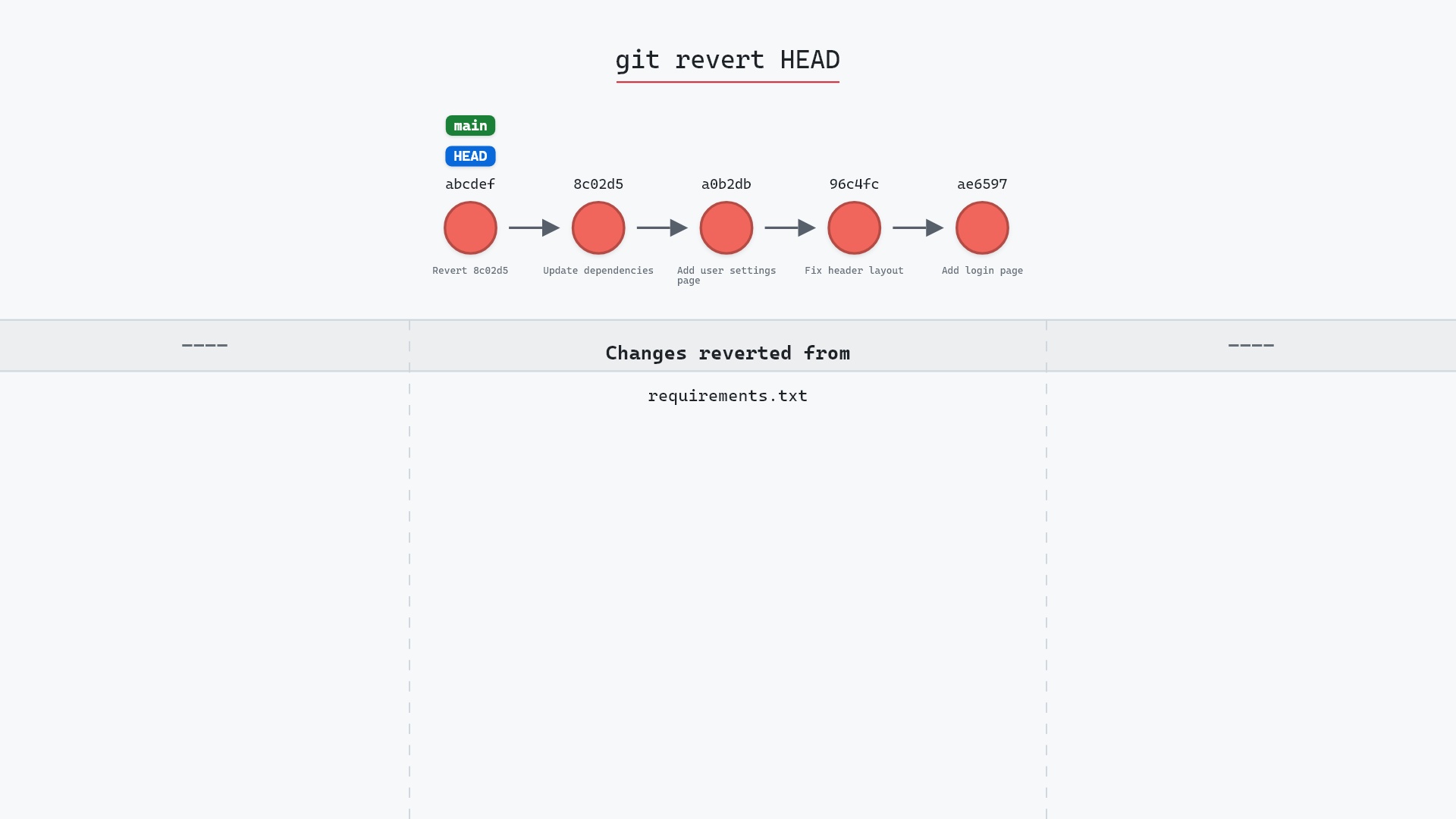
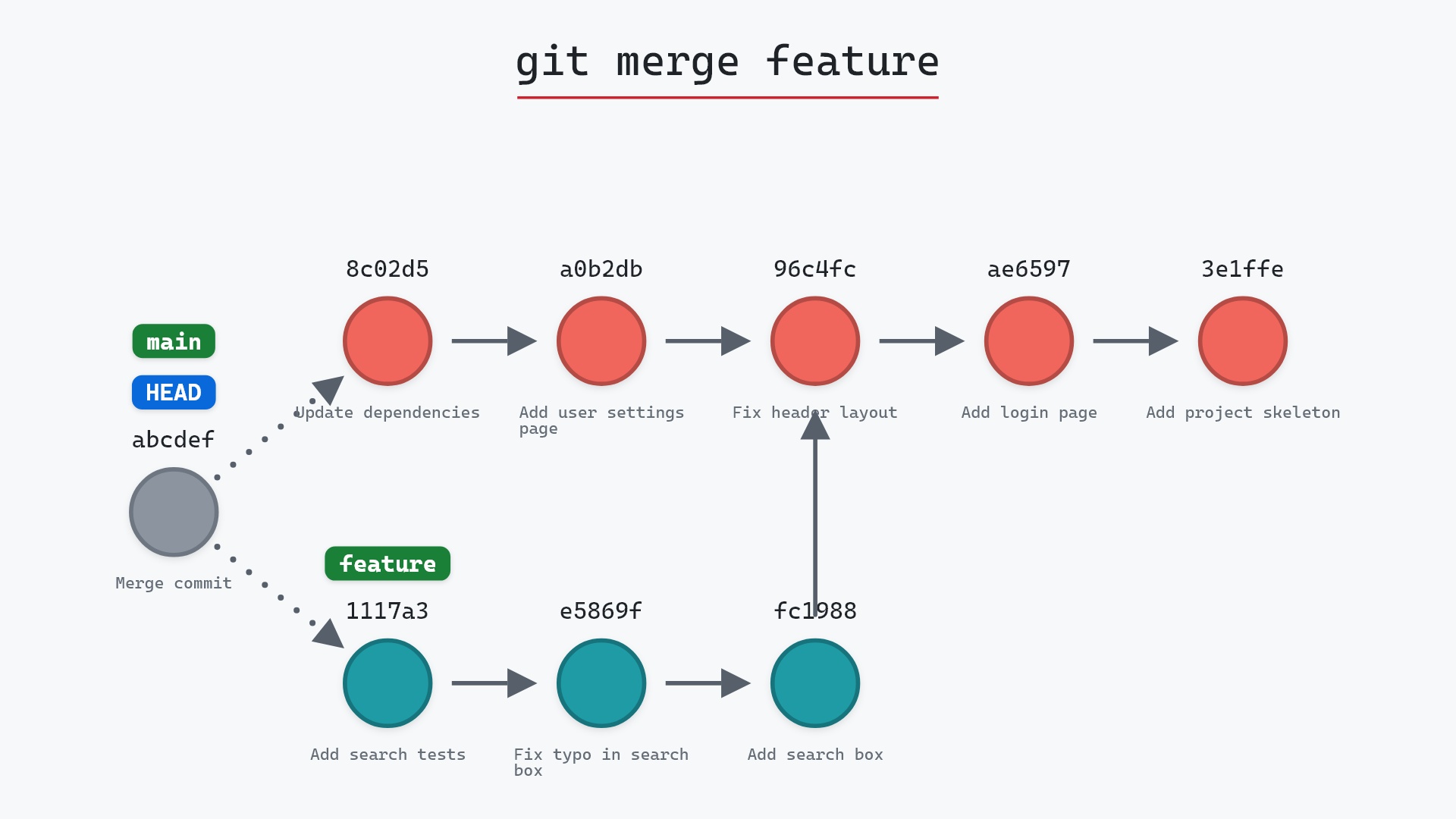
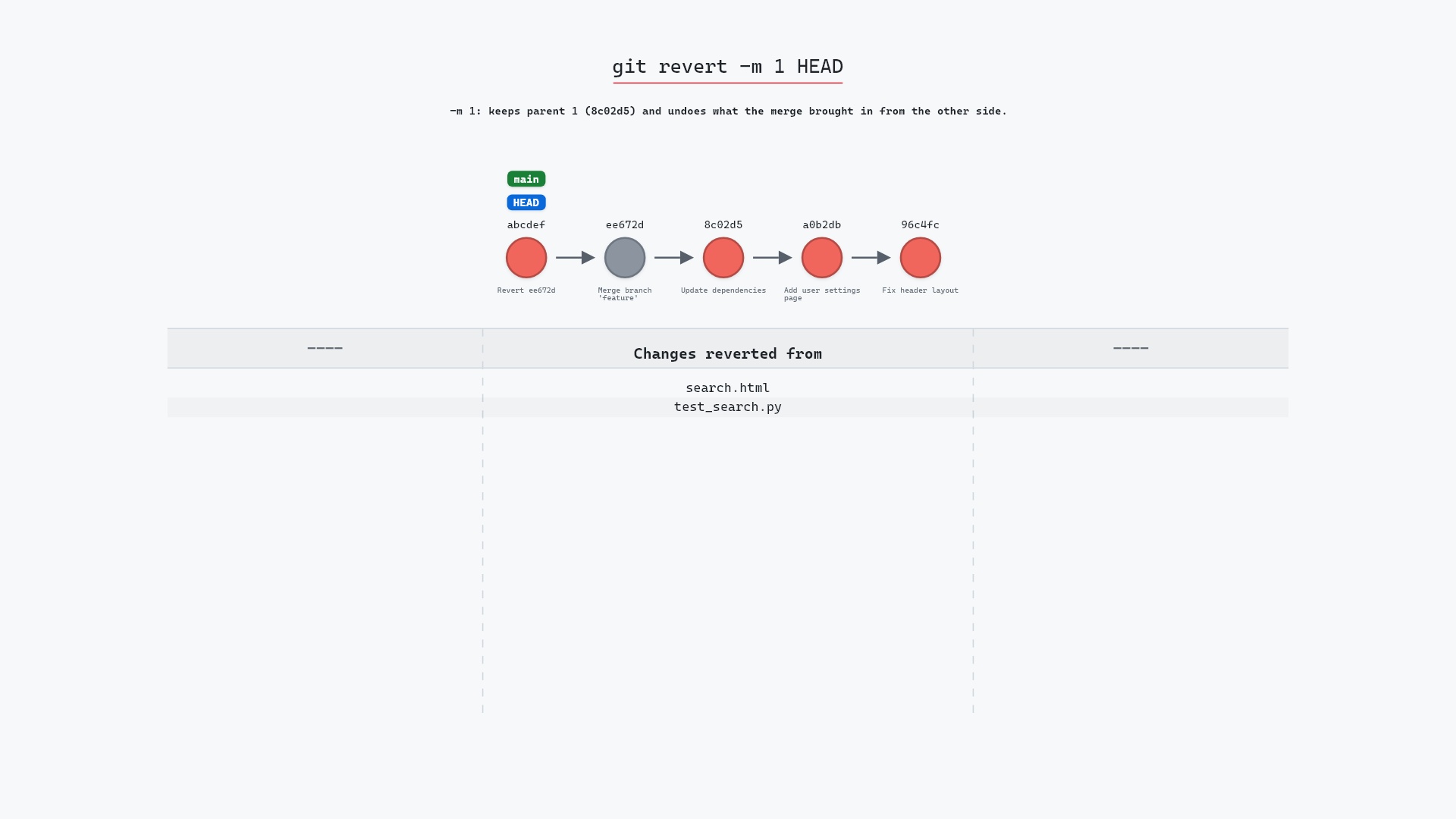
Our sample repo has feature merged into main a moment ago: ee672dd, "Merge branch 'feature'", whose first parent is 8c02d5b "Update dependencies" (from main) and whose second parent is 1117a34 "Add search tests" (the tip of feature). Here's git revert -m 1 HEAD:
- Before:
HEADis attached tomainat the merge commitee672dd, whose second parent is1117a34, the tip offeature. - Git creates a new commit with
ee672ddas its parent. It deletessearch.htmlandtest_search.py, the files the merge brought in fromfeature. mainmoves to the new commit, andHEADmoves with it.-m 1tells Git to keep parent 1 (8c02d5b) as the mainline and undo what came in from the other parent.
git-sim labels the new commit with a placeholder hash, since it can't know the real one before the commit exists. The real run produced d4e30b5.
Before and after
main gained one commit, d4e30b5 Revert "Merge branch 'feature'". The merge ee672dd and all three feature commits are still there, and feature itself hasn't moved. Git's output shows what the revert took away:
The raw git output, if you want to read along in text
git log --oneline --graph --all
before
*   ee672dd (HEAD -> main) Merge branch 'feature'
|\
| * 1117a34 (feature) Add search tests
| * e5869f0 Fix typo in search box
| * fc19889 Add search box
* | 8c02d5b Update dependencies
* | a0b2db3 Add user settings page
|/
* 96c4fc2 Fix header layout
* ae65976 Add login page
* 3e1ffe4 Add project skeleton
* 4114b2c Initial commit
after
* d4e30b5 (HEAD -> main) Revert "Merge branch 'feature'"
*   ee672dd Merge branch 'feature'
|\
| * 1117a34 (feature) Add search tests
| * e5869f0 Fix typo in search box
| * fc19889 Add search box
* | 8c02d5b Update dependencies
* | a0b2db3 Add user settings page
|/
* 96c4fc2 Fix header layout
* ae65976 Add login page
* 3e1ffe4 Add project skeleton
* 4114b2c Initial commit
what git printed
[main d4e30b5] Revert "Merge branch 'feature'"
 Date: Wed May 1 22:00:00 2024 +0000
 2 files changed, 3 deletions(-)
 delete mode 100644 search.html
 delete mode 100644 test_search.py
"Add search box" created search.html and "Add search tests" created test_search.py, so undoing the merge deletes both. "Fix typo in search box" only changed search.html, so it has nothing of its own to undo. The working directory now matches 8c02d5b, while the history records both the merge and its reversal. Git also writes "This reverts commit ee672dd..., reversing changes made to 8c02d5b..." into the commit message body, so the log says which side was kept.
What -m 2 would do
-m 2 treats the second parent, 1117a34, as the mainline, and undoes what main contributed to the merge instead: "Add user settings page" and "Update dependencies". That's almost never what you want on main, so -m 1 is the form you'll see nearly every time. git log --format="%h %p" -1 ee672dd or git show ee672dd shows the parents in order, if you want to check which is which.
The catch: merging the branch again
Here's the part that surprises people. The revert undid the merge's changes, but not the merge itself. As far as Git's history is concerned, fc19889, e5869f0 and 1117a34 are still part of main, since ee672dd has them as ancestors.
Say you fix the bug on feature with a new commit and run git merge feature again. Git looks for commits on feature that main doesn't have, finds only your new fix, and merges just that. The search box and its tests stay deleted, because as far as Git knows they were merged already, and then deliberately removed.
The fix is to revert the revert before merging again:
git revert d4e30b5
git merge feature
The first command brings search.html and test_search.py back as a new commit, and the merge then adds the fix on top. Git's own documentation has a long write-up of this, "How to revert a faulty merge" (Documentation/howto/revert-a-faulty-merge.adoc in Git's source), in which Linus Torvalds and Junio Hamano walk through this exact trap.
-m numbers are easy to get backwards, and seeing a hash you recognize is much more reassuring than a bare "1".
Is it safe?
Safe git-sim pre-flight
'revert' creates a new commit undoing another; existing history is untouched.
Like any revert, it only adds a commit, so nothing is lost and it's fine on a shared branch. The risk is the one above: later merges of the same branch won't bring the reverted work back on their own.
How to undo it
Revert the revert:
git revert HEAD
which adds a commit putting search.html and test_search.py back. If nothing has been pushed yet, git reset --hard HEAD~1 removes d4e30b5 instead and leaves main on the merge.
Here's the merge being made in the first place:
Try it on your repository
pip install git-sim
git-sim revert -m 1 HEAD
git-sim draws the revert commit on top of your merge, lists the files it would take back out, and says which parent it keeps.
Common questions
How do I revert a merge commit?
git revert -m 1 <merge-sha>. The -m 1 keeps the first parent (usually main) and undoes what the merge brought in from the other branch.
What does -m 1 mean in git revert?
It picks the merge's first parent as the mainline. The revert makes your files match that parent again. -m 2 would pick the second parent instead.
Why doesn't merging the branch again bring my changes back?
Because the branch's commits are still in main's history, and Git only merges commits that aren't there yet. Revert the revert commit first, then merge.
Should I revert a merge or reset it?
If the merge has been pushed, revert. If it's only local, git reset --hard HEAD~1 removes it cleanly and avoids the re-merge trap entirely.
Summary
In this article, we watched git revert -m 1 add a commit that undid everything feature brought into main, saw which files it deleted, and covered why the branch needs the revert reverted before it can be merged again.
Next steps
git revert covers reverting ordinary commits. git merge explains what the two parents of a merge commit are.
Related commands
- git revert, for ordinary commits
- git merge, which made the commit being reverted
- git reset --hard, the local-only alternative
- git log, to find the merge and its parents
- git bisect, to find out whether the merge is really what broke things
- git diff, to compare
mainwith either parent